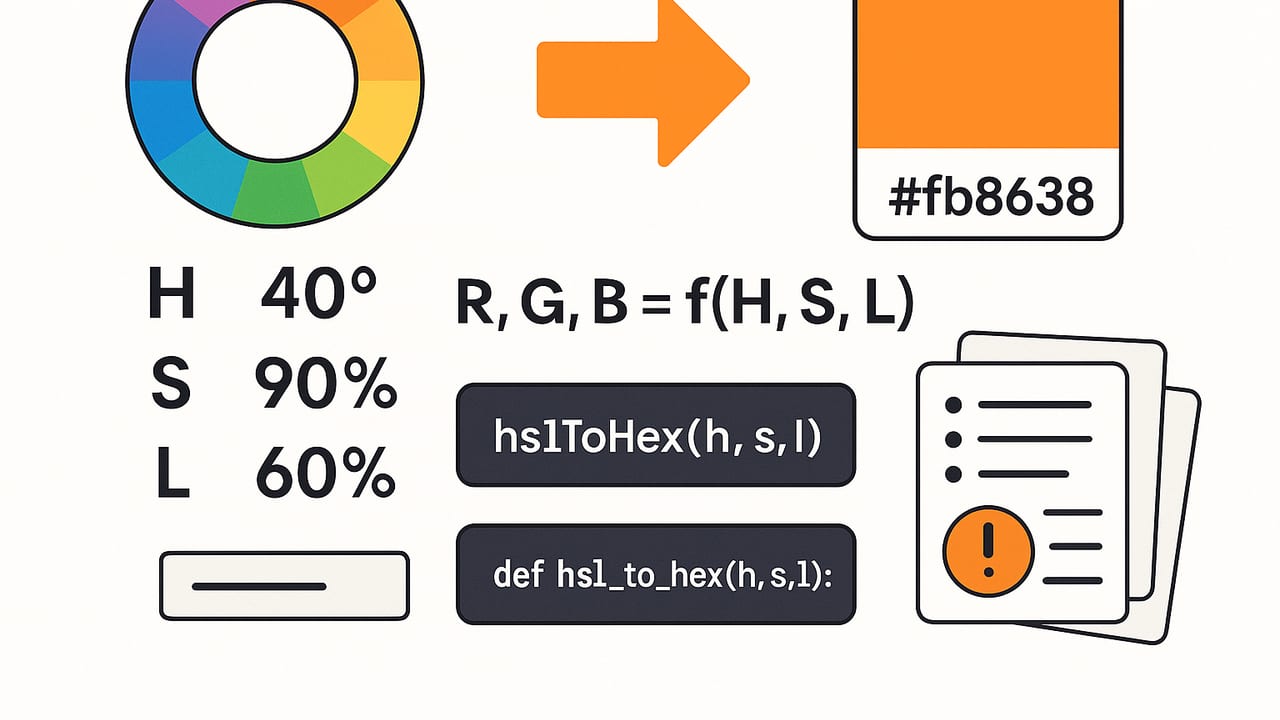
Converting HSL to HEX is a common need for designers and developers who work across design tools, CSS, and code. HSL (Hue, Saturation, Lightness) is intuitive for creating and adjusting colors, while HEX (#RRGGBB) remains the most portable and widely used notation on the web. This guide explains the math behind the conversion, provides battle-tested JavaScript and Python functions, covers rounding and edge cases, and shares practical tips for reliable results.
What HSL and HEX Actually Represent
HSL expresses a color in terms of:
- Hue (H): The angle on the color wheel in degrees, typically 0–360 (0 and 360 both mean red).
- Saturation (S): Intensity of the color, often 0–100%.
- Lightness (L): Perceived brightness, often 0–100% where 0% is black, 50% is "normal" color intensity, and 100% is white.
HEX is a hexadecimal encoding of RGB in the sRGB color space: #RRGGBB, where RR, GG, and BB are two-digit hex values (00–FF) for red, green, and blue respectively. There’s also HEX8 (#RRGGBBAA) for alpha transparency.
Important assumptions:
- sRGB: The standard for web colors. HSL, as commonly implemented for the web, is defined with respect to sRGB. If you’re in a wide-gamut or color-managed workflow, convert/assume sRGB before doing HSL to HEX.
- HSL vs HSV/HSB: HSL is not the same as HSV/HSB. If your source is HSV, convert HSV→RGB→HEX, not HSV→HSL→HEX unless you know why you’re doing it.
The Math: HSL to RGB to HEX
HEX is just a formatting of RGB, so the core task is HSL → RGB. The canonical algorithm uses an intermediate pair p and q, then computes RGB via a helper that wraps hue on the unit circle.
Algorithm overview
- Normalize inputs:
- Hue
hin degrees →h1 = (h mod 360) / 360in [0,1). - Saturation
sand lightnesslin percentages → divide by 100 to get [0,1].
- Hue
- If
s == 0, the color is achromatic:r = g = b = l. - Else compute:
q = l < 0.5 ? l * (1 + s) : l + s - l * sp = 2 * l - qr = hue2rgb(p, q, h1 + 1/3),g = hue2rgb(p, q, h1),b = hue2rgb(p, q, h1 - 1/3)
- Scale to 0–255 and round to nearest integer.
- Format as HEX:
#+ two-digit hex for each channel.
The hue2rgb helper:
function hue2rgb(p, q, t) {
  if (t < 0) t += 1;
  if (t > 1) t -= 1;
  if (t < 1/6) return p + (q - p) * 6 * t;
  if (t < 1/2) return q;
  if (t < 2/3) return p + (q - p) * (2/3 - t) * 6;
  return p;
}
Note: Unlike physical light computations, this conversion uses gamma-encoded sRGB directly. You do not linearize RGB for HSL conversion.
JavaScript: Reliable HSL to HEX (with optional alpha)
The function below accepts hue in degrees and saturation/lightness as either percentages (0–100) or [0,1]. It also supports an optional alpha for HSLA and outputs HEX (#RRGGBB) or HEX8 (#RRGGBBAA) when alpha is provided.
function hslToHex(h, s, l, a = null) {
  // normalize inputs
  const hue = ((h % 360) + 360) % 360; // wrap negatives
  const sat = s > 1 ? s / 100 : s;     // accept 0..100 or 0..1
  const lig = l > 1 ? l / 100 : l;     // accept 0..100 or 0..1

  let r, g, b;
  if (sat === 0) {
    r = g = b = lig; // achromatic
  } else {
    const q = lig < 0.5 ? lig * (1 + sat) : lig + sat - lig * sat;
    const p = 2 * lig - q;
    const h1 = hue / 360;

    const hue2rgb = (p, q, t) => {
      if (t < 0) t += 1;
      if (t > 1) t -= 1;
      if (t < 1/6) return p + (q - p) * 6 * t;
      if (t < 1/2) return q;
      if (t < 2/3) return p + (q - p) * (2/3 - t) * 6;
      return p;
    };

    r = hue2rgb(p, q, h1 + 1/3);
    g = hue2rgb(p, q, h1);
    b = hue2rgb(p, q, h1 - 1/3);
  }

  const toByte = x => Math.round(Math.min(Math.max(x, 0), 1) * 255);
  const toHex2 = n => n.toString(16).padStart(2, '0').toUpperCase();

  const R = toByte(r), G = toByte(g), B = toByte(b);
  if (a == null) {
    return `#${toHex2(R)}${toHex2(G)}${toHex2(B)}`;
  } else {
    const alpha = a > 1 ? a / 100 : a; // accept 0..100 or 0..1
    const A = toByte(alpha);
    return `#${toHex2(R)}${toHex2(G)}${toHex2(B)}${toHex2(A)}`; // HEX8 (RRGGBBAA)
  }
}

// Examples
console.log(hslToHex(0, 100, 50));        // #FF0000
console.log(hslToHex(210, 50, 40));       // #336699
console.log(hslToHex(30, 100, 50));       // #FF8000
console.log(hslToHex(200, 100, 50, 0.3)); // #00AAFF4D
Python: Precise HSL to HEX
The Python version mirrors the same logic. It returns uppercase HEX and supports optional alpha.
def hsl_to_hex(h, s, l, a=None):
    hue = (h % 360 + 360) % 360
    sat = s / 100.0 if s > 1 else float(s)
    lig = l / 100.0 if l > 1 else float(l)

    if sat == 0:
        r = g = b = lig
    else:
        q = lig * (1 + sat) if lig < 0.5 else lig + sat - lig * sat
        p = 2 * lig - q
        h1 = hue / 360.0

        def hue2rgb(p, q, t):
            if t < 0:
                t += 1
            if t > 1:
                t -= 1
            if t < 1/6:
                return p + (q - p) * 6 * t
            if t < 1/2:
                return q
            if t < 2/3:
                return p + (q - p) * (2/3 - t) * 6
            return p

        r = hue2rgb(p, q, h1 + 1/3)
        g = hue2rgb(p, q, h1)
        b = hue2rgb(p, q, h1 - 1/3)

    def to_byte(x):
        x = max(0.0, min(1.0, x))
        return int(round(x * 255))

    R, G, B = to_byte(r), to_byte(g), to_byte(b)
    if a is None:
        return f"#{R:02X}{G:02X}{B:02X}"
    else:
        alpha = a / 100.0 if a > 1 else float(a)
        A = to_byte(alpha)
        return f"#{R:02X}{G:02X}{B:02X}{A:02X}"

# Examples
print(hsl_to_hex(0, 100, 50))        # #FF0000
print(hsl_to_hex(210, 50, 40))       # #336699
print(hsl_to_hex(30, 100, 50))       # #FF8000
print(hsl_to_hex(200, 100, 50, 0.3)) # #00AAFF4D
Ranges, Units, and Rounding Rules
- Hue: Accept angles beyond 0–360 by wrapping with modulus. Negative hues should wrap too (e.g., −30 → 330).
- Saturation & Lightness: Commonly expressed as percentages; convert to [0,1] by dividing by 100. Clamp to [0,1] before scaling to bytes.
- Rounding: Use round-to-nearest for RGB bytes and alpha. This avoids systematic bias.
- Alpha: CSS 8-digit HEX is #RRGGBBAA (alpha last). Multiply alpha [0,1] by 255 and round.
Edge Cases and Common Pitfalls
- Achromatic colors (S=0): Hue is ignored.
hsl(h, 0, l)should yieldrgb(l, l, l)→ gray ramp from#000000to#FFFFFF. Example:hsl(0,0%,50%) → #808080. - Lightness extremes: At L=0 you always get
#000000; at L=100% you always get#FFFFFF; at L=50% and S=100%, you get the most vivid colors. - Hue wrap-around: 360° equals 0°. Always normalize hue to [0,360) to avoid branch glitches.
- HSV vs HSL: Do not feed HSV values into an HSL converter. Many API names say "HSB" (which usually means HSV). Confirm the model before converting.
- Gamma confusion: HSL is defined over gamma-encoded sRGB. Don’t linearize RGB for HSL↔RGB; you’ll get wrong results.
- Shorthand HEX: Some colors can compress to 3-digit HEX (e.g.,
#FFFFFF→#FFF). This is optional and purely cosmetic. - Case and formatting: HEX is case-insensitive. Uppercase improves readability; consistency matters more than case.
- Alpha placement: In CSS,
#RRGGBBAAputs alpha at the end, not the beginning. Don’t output#AARRGGBBfor CSS.
Sample HSL to HEX Conversions
Use these as quick references or unit tests.
| HSL | HEX | Notes |
|---|---|---|
| hsl(0, 100%, 50%) | #FF0000 | Red |
| hsl(120, 100%, 50%) | #00FF00 | Green |
| hsl(240, 100%, 50%) | #0000FF | Blue |
| hsl(60, 100%, 50%) | #FFFF00 | Yellow |
| hsl(180, 100%, 50%) | #00FFFF | Cyan |
| hsl(300, 100%, 50%) | #FF00FF | Magenta |
| hsl(0, 0%, 0%) | #000000 | Black |
| hsl(0, 0%, 50%) | #808080 | Gray |
| hsl(0, 0%, 100%) | #FFFFFF | White |
| hsl(210, 50%, 40%) | #336699 | Steel-like blue |
Using HSL and HEX in CSS
CSS supports both HSL and HEX. Choose the one that matches your workflow:
- Authoring: HSL is highly readable for systematic palettes (e.g., rotate hue by 30°, adjust lightness by 10%).
- Delivery: HEX is compact, familiar, and supported everywhere, including legacy toolchains.
Examples:
/* HSL and HSLA (CSS Color 4 also supports space-separated notation) */
.button-primary { background: hsl(210 90% 56%); }
.button-primary:hover { background: hsl(210 90% 46% / 0.9); }

/* HEX and HEX8 */
.card { border-color: #336699; }
.overlay { background-color: #00000080; /* 50% alpha */ }
If you manage palettes in HSL but need HEX at build time, integrate a small conversion utility (like the functions above) into your design tokens pipeline. Many preprocessors or build systems can compute these values ahead of time to avoid runtime work.
Testing and Validating Your Conversion
- Round-trip checks: Convert HSL→HEX and then HEX→HSL using a trusted library and verify minimal drift (expect small rounding differences when toggling representations).
- Known anchors: Test pure primaries and grays (see table) to validate hue handling and achromatic branches.
- Randomized tests: Generate random H,S,L values, convert to RGB/HEX using your code and a reference library (e.g., CSS Color 4 implementations), and compare.
- Edge scanning: Explicitly test S=0, L=0, L=1, and H near 0/360 to ensure proper wrap-around and clamping.
When Precision Matters
In most web use cases, integer RGB with rounding-to-nearest is sufficient. However, consider these nuances:
- Palette consistency across platforms: Make sure every platform assumes sRGB; otherwise, colors can shift on wide-gamut displays.
- Alpha math: When converting HSLA to HEX8, ensure alpha rounding is consistent across your toolchain to avoid one-off transparency differences.
- Design tokens: Store canonical colors in HSL or LCH for editability, then generate HEX/RGB for consumption to avoid accumulated rounding over repeated edits.
Practical Tips for Designers and Developers
- Start in HSL for ideation and scaling palettes. Lock hue for a family, vary lightness for states (hover/active), and adjust saturation for emphasis vs. subdued UI.
- Export in HEX for handoff, tokens, or CSS variables. Consistent uppercase helps visual diffing in code reviews.
- Mind accessibility: When tweaking lightness, measure contrast with WCAG tools; small lightness changes can markedly affect readability.
Rule of thumb: Author in HSL for clarity; deliver in HEX for compatibility.
Summary
To convert HSL to HEX reliably, normalize inputs, use the standard p/q/hue2rgb algorithm, round to nearest for bytes, and format as #RRGGBB (or #RRGGBBAA for alpha). Avoid common pitfalls like confusing HSV for HSL or misplacing alpha. With the JavaScript and Python snippets above, you can confidently integrate HSL-to-HEX conversion into your tools, pipelines, and design systems.
If you prefer sampling colors from photos and exporting both HSL and HEX without manual math, the iOS/iPad app Color Viewfinder can help streamline that step in your workflow.