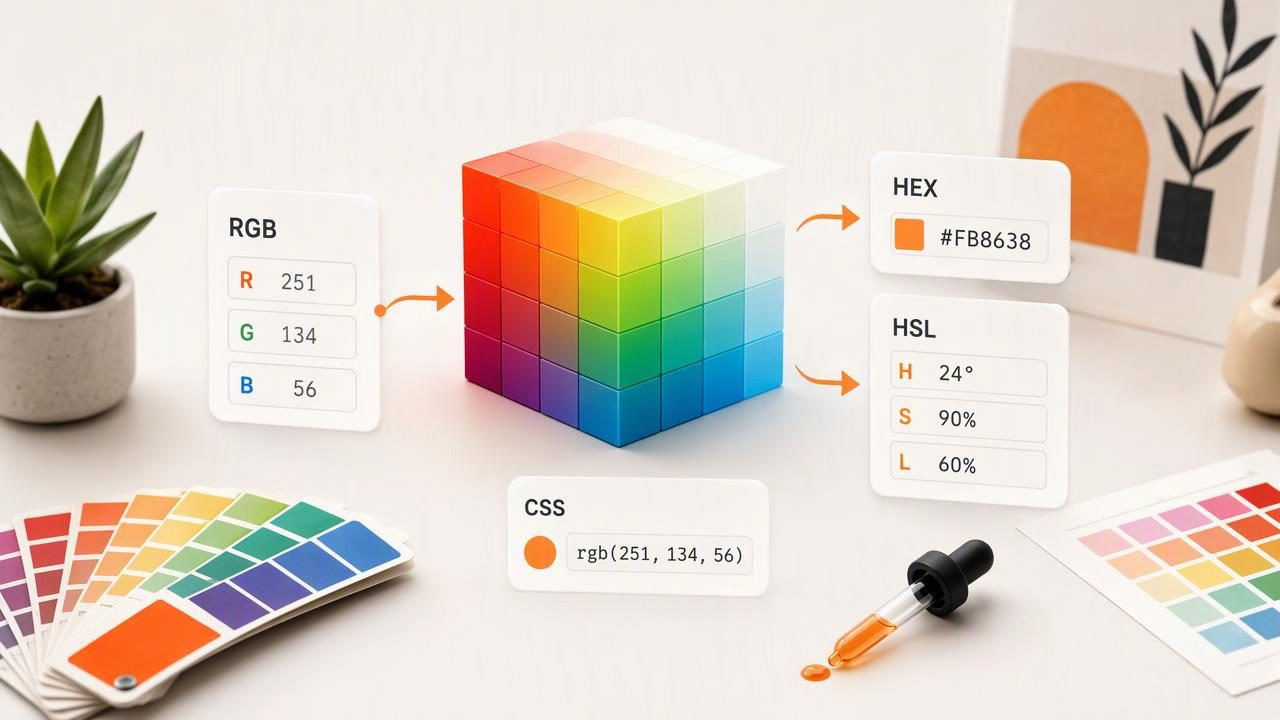
An RGB converter helps designers translate one color format into another without changing the intended digital color. Whether you are building a website, preparing a graphic design file, documenting a brand palette, or collecting inspiration from a photo, understanding RGB, HEX, and HSL values makes color communication far more reliable.
For example, a warm coral may be written as RGB(242, 121, 107), #F2796B, or HSL(7, 83%, 68%). These formats look different on paper, but they describe the same screen color when converted correctly. An RGB converter performs the mathematical translation so you can use the appropriate format for your design tool, CSS file, style guide, or creative brief.
This guide explains how RGB conversion works, when to use each format, how to convert values manually, and how to avoid common color workflow mistakes.
What Is an RGB Converter?
An RGB converter is a tool or calculation that changes an RGB color value into another color notation, such as HEX, HSL, HSB, or CSS-ready syntax. RGB stands for red, green, and blue, the three light-based color channels used by digital displays.
Every RGB channel has a value from 0 to 255:
- 0 means none of that channel is present.
- 255 means the channel is at full intensity.
- Combining the three values creates a digital color.
For instance, RGB(255, 0, 0) is pure red because red is at maximum intensity while green and blue are absent. RGB(255, 255, 255) is white, while RGB(0, 0, 0) is black.
RGB is especially useful because it is readable, widely supported, and directly connected to how screens produce color. However, many workflows require a different format. Web developers commonly use HEX or CSS functions, while designers may prefer HSL or HSB because those formats make hue, saturation, and brightness easier to adjust intentionally.
RGB, HEX, HSL, and HSB: What Is the Difference?
Each notation describes color differently. Choosing the right one depends on what you need to do next.
| Format | Example | Best Use |
|---|---|---|
| RGB | rgb(242, 121, 107) | Digital design, interfaces, image editing, technical specifications |
| HEX | #F2796B | Web design, CSS, design systems, quick copy-and-paste references |
| HSL | hsl(7, 83%, 68%) | Adjusting hue, lightness, and saturation in CSS and design exploration |
| HSB/HSV | hsb(7, 56%, 95%) | Visual color selection in many graphics applications |
HEX is simply another way to represent RGB values. It uses hexadecimal numbers, from 00 to FF, for each red, green, and blue channel. HSL and HSB are different models that organize a color around its hue and perceived intensity rather than three individual light channels.
How to Convert RGB to HEX
To convert RGB to HEX, convert each decimal channel value from 0–255 into a two-character hexadecimal value. Then combine the red, green, and blue pairs after a hash symbol.
Use this RGB color as an example:
RGB(242, 121, 107)The conversion is:
- Red:
242becomesF2. - Green:
121becomes79. - Blue:
107becomes6B. - Combine the values:
#F2796B.
Therefore:
rgb(242, 121, 107) = #F2796BIn practice, an RGB converter is usually faster than doing hexadecimal math by hand. Still, knowing the structure is helpful when checking design tokens, reviewing a developer handoff, or spotting an incorrectly entered code.
Quick RGB-to-HEX Reference
| RGB Value | HEX Value | Color Description |
|---|---|---|
rgb(255, 255, 255) | #FFFFFF | White |
rgb(0, 0, 0) | #000000 | Black |
rgb(255, 0, 0) | #FF0000 | Red |
rgb(0, 128, 255) | #0080FF | Bright blue |
rgb(34, 139, 34) | #228B22 | Forest green |
How to Convert RGB to HSL
RGB-to-HSL conversion is more involved because HSL describes color using three perceptual controls:
- Hue: the position on the color wheel, measured from 0 to 360 degrees.
- Saturation: the strength or purity of the hue, measured as a percentage.
- Lightness: how light or dark the color appears, also measured as a percentage.
Unlike HEX, HSL is not created by converting each RGB channel independently. The RGB values are first normalized to numbers between 0 and 1, then compared to identify the highest and lowest channels. Those relationships determine hue, saturation, and lightness.
For the coral example, the output is approximately:
rgb(242, 121, 107)
hsl(7, 83%, 68%)
HSL is useful when you want to create controlled variations from one base color. If your primary brand color is hsl(7, 83%, 68%), you can retain the same hue while reducing saturation for a muted accent or changing lightness for a darker button state.
Using RGB Values in CSS
Modern CSS supports several color formats, so an RGB converter gives developers flexibility. These declarations can render the same coral color:
.accent {
  color: rgb(242, 121, 107);
  color: #F2796B;
  color: hsl(7, 83%, 68%);
}
You can also add transparency with the rgba() function or modern RGB slash syntax:
.overlay {
  background-color: rgb(242 121 107 / 70%);
}
Transparency is separate from the base RGB color. A 70% opacity coral overlay may look different depending on the background beneath it, so evaluate it in the final interface rather than judging the value in isolation.
A Practical RGB Converter Workflow for Creative Projects
A reliable color workflow starts with a clear source and ends with organized, reusable values. This is particularly helpful when a photo contains a mood, material, or color relationship you want to reference in a digital project.
- Choose a useful source image. Use a well-lit photo with clear color areas. Images with extreme filters, shadows, or colored lighting can produce misleading samples.
- Sample more than one point. A fabric, wall, flower, or object may contain highlights, midtones, and shadows. Capture the dominant tone rather than relying on a single accidental pixel.
- Record the RGB value. RGB is a practical baseline because it translates easily into HEX, HSL, HSB, and CSS formats.
- Convert for the destination. Use HEX for a web handoff, HSL for planned variations, and RGB where a design application or technical document requests it.
- Label the color by purpose. Names such as “primary coral,” “soft neutral,” or “deep accent” are more useful than unnamed code strings.
- Check the palette together. A color can work alone but feel unbalanced beside other selected colors.
Common RGB Conversion Mistakes to Avoid
Assuming a screen value guarantees a paint match
RGB, HEX, HSL, and HSB are digital color references. They are valuable for planning palettes, sharing visual direction, and building digital assets, but they do not guarantee a physical paint, fabric, ink, or material match. Screen calibration, lighting conditions, surface texture, and printing processes all affect appearance.
Copying the wrong format into a tool
A HEX code includes a hash symbol, such as #F2796B. RGB is usually entered as three values, while HSL requires degrees and percentages. Check the field label before pasting values into a website builder, graphics program, or design system.
Confusing HSL with HSB
HSL and HSB may display similar-looking controls, but lightness and brightness are not interchangeable. A value converted from RGB into HSL may not use the same percentage values as an HSB representation. Always note which color model your tool is showing.
Sampling from an altered image
Photo filters, automatic white balance, HDR processing, reflections, and colored room lighting can change sampled RGB values. Treat photo extraction as a useful visual reference, then review the palette in the context where it will be used.
When Should You Use an RGB Converter?
An RGB converter is useful whenever color information has to move between people, devices, or software. Common use cases include:
- Converting a graphic designer’s RGB specification into HEX for a website.
- Building CSS color variables from a photo-inspired palette.
- Turning a sampled image color into HSL for lighter and darker UI states.
- Documenting brand colors consistently across presentations and digital assets.
- Creating visual references for interior design concepts without treating screen values as physical material matches.
- Organizing color notes for illustration, social graphics, photography, or other creative projects.
The key benefit is consistency. Instead of describing a color as “somewhat muted orange,” you can share a specific value and convert it into the format each collaborator needs.
Make Color Conversion Part of Your Design Process
A good RGB converter does more than change numbers. It creates a bridge between visual inspiration and usable design data. Start with a color you can see, capture its RGB value, convert it for the needed platform, and keep the values organized within a palette.
For photo-based color exploration on iPhone or iPad, Color Viewfinder’s guide to picking HEX colors from photos explains how extracted values can become practical palette references for digital creative work.